



Arabic Text to PDF: Fix Disconnected Letters, Fonts, and Mixed English Text
If Arabic text breaks during PDF conversion, first identify what changed. A row of empty boxes is a different problem from letters that no longer connect. A reversed-looking reference number is different again. One font change cannot reliably solve all three.
The useful checks are encoding, shaping, direction, and appearance. Check them on a short sample, then export the full document once you know which result to expect.
The Arabic Text to PDF tool lets you create a new document from editable text, set its direction, format it, and choose page settings. It does not extract words from a scanned Arabic page.
Start by matching the symptom
| What you see | First distinction to make |
|---|---|
| Empty boxes or missing marks | Is the source readable, and can the output font display the required characters? |
| Unexpected separate letter shapes | Is this a shaping problem, or a normal gap after a non-joining letter? |
| English words or punctuation in a surprising position | Is the paragraph's base direction correct? |
| Readable Arabic in an unwanted style | Does the workflow offer the exact font the recipient requires? |
| Correct appearance but awkward copied text | Does the PDF reader extract the mixed-script text in a useful order? |
Arabic letter shapes depend on context, and some letters do not join on both sides. The W3C's working draft on Arabic and Persian layout describes shaping and positioning separately from text direction. A visible gap is not automatically an error.
Reproduce the workflow with a workshop note
Download the Arabic workshop text. It is a fictional note containing a heading, Arabic sentences, an English project name, a reference, an amount, a URL, and a line with diacritics.
The sample deliberately includes details that are easy to overlook:
| Item | Source value to check |
|---|---|
| Project | Atlas Studio |
| Reference | AR-2026-018 |
| Amount and currency | 125.50 and USD |
| Web address | https://example.com/workshop?id=18 |
[email protected] |
The date and names belong to the example, not a real workshop. Compare your export with the complete sample Arabic PDF.
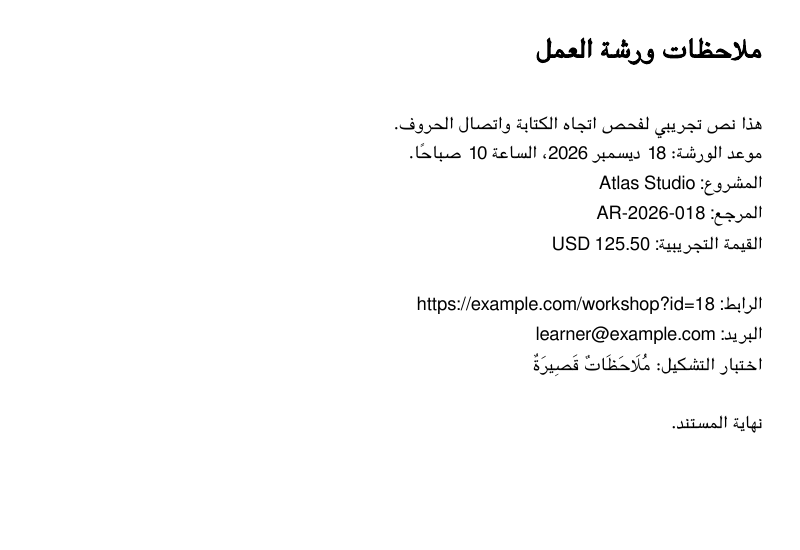
This crop shows the text area. The downloadable PDF preserves the complete A4 page.
1. Check the source before changing the layout
Open Arabic Text to PDF. Use Load file (.md, .txt) on desktop, Browse on a phone, or paste the text into the editor.
If an ordinary Arabic sentence already appears as unrelated symbols, return to the source application and obtain a readable Unicode version. Exporting damaged input cannot recover the intended letters. For a file you create yourself, save the text as UTF-8.
If the source is a screenshot or scanned PDF, you need recognized text before using this editor. Putting an image on a page does not turn its Arabic words into searchable text.
Use a plain-text sample while troubleshooting. It is easier to identify a character or direction problem without unrelated styles copied from another editor.
2. Set the document's direction
Choose RTL in Text direction. The Arabic page starts in RTL mode; on a phone the controls are available through PDF settings.
RTL establishes the document's reading context. Right alignment moves a paragraph to the right edge but does not, by itself, resolve the order of mixed-script text.
Do not reverse English names, dates, or addresses manually. Keep Atlas Studio and the email address in their normal stored order. The W3C guide to mixed-direction text explains how left-to-right phrases and numbers can occur inside an overall right-to-left paragraph.
For the sample, leave the reference and contact details on their own lines so they are easy to inspect. Currency codes, punctuation, and numbers can still be positioned according to the surrounding direction. Check that the amount and currency are associated correctly rather than assuming every mixed line will resemble an English sentence.
The current editor provides document-level direction controls, not a full set of controls for isolating every inline phrase. If a complex contract, table, or form requires exact mixed-direction ordering that this workflow does not produce, use a document editor that gives you the necessary paragraph and inline control.
3. Check the font result instead of searching for a missing setting
The PDF exporter chooses fonts automatically. The current interface does not have a font-family dropdown for selecting a particular Arabic typeface.
Select the heading and choose a heading style if you want to reproduce the example. Check the body text separately, including dots and the diacritics in the final section. Enlarging a title does not establish that all smaller marks in the body are present.
Do not assume that the browser preview and PDF use identical fonts or line metrics. Compare the download. If an organization specifies a particular typeface, a fixed line count, or exact page breaks, those requirements need a workflow with explicit font and layout control.
4. Export a short document first
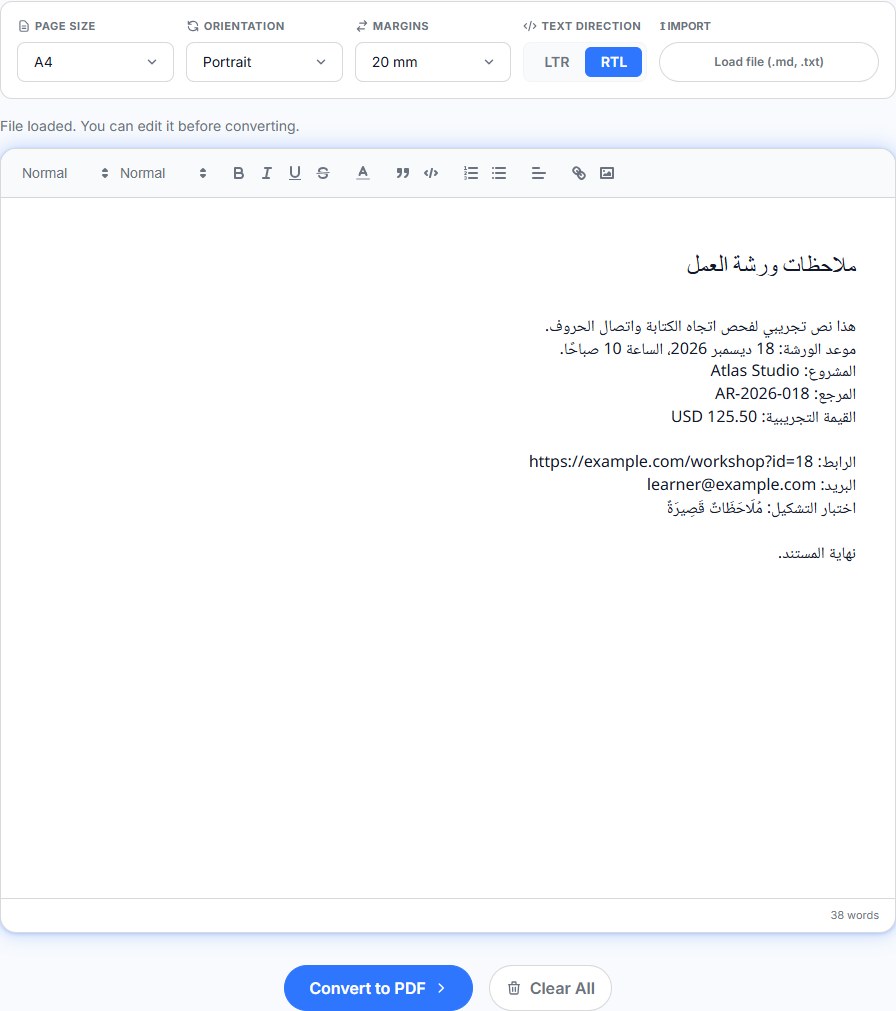
The sample uses A4, Portrait, 20 mm margins, and RTL. Choose those settings, format the first line as a heading, then select Convert to PDF.
Use the paper size your recipient expects. Reducing margins may fit more text, but it can make a document harder to print. A short test should contain your difficult characters and mixed-script details, not only a simple greeting.
The current conversion sends your editor content to RizCraft's server to generate the PDF. The browser interface does not make the export a device-only operation. Use a local document workflow when that is a requirement for your material.
5. Review appearance and copied text separately
Open the actual saved PDF and check its first and final lines. Then compare:
- Several connected words, rather than one isolated letter.
- Dots and diacritics at a readable zoom level.
AR-2026-018, including every hyphen and digit.- The amount
125.50and its currency code. - The complete URL, including
?id=18, and the email address.
Try selecting text and searching for the Latin reference. Copy an Arabic sentence and a mixed-script line into a plain-text editor. Different PDF readers and extraction workflows can treat directional runs differently, so a good-looking page is not a guarantee of identical copy/paste order.
Keep the original source as the editable master. If exact downstream text extraction is essential, test that downstream system with a short PDF before preparing the entire document.
If the short export still fails
Compare three stages: the source text, the editor, and the saved PDF. If the source is wrong, repair the input. If the editor is readable but the PDF changes characters or direction, keep a minimal example that reproduces the change. Repeatedly re-pasting the whole document makes the cause harder to isolate.
For a required font or a complicated mixed-direction layout, use a tool with those specific controls. For a simple note or letter, create an Arabic PDF from the sample first, inspect it, and then replace it with your own text. The general Text to PDF editor provides the corresponding workflow for other documents.