



How to Print Source Code to PDF Without Cutting Off Long Lines
A source-code PDF needs to preserve more than the words. Indentation must remain readable, the right edge must contain the complete statement, and line references must still make sense when one source line wraps over several visual rows.
Start with Code to PDF, choose a readable page layout, and inspect the downloaded listing. The converter wraps long source lines automatically; this guide shows how to make those wraps less disruptive and how to check that the result is complete.
It produces a document for reading or printing. It does not execute the program, validate its behavior, or render an HTML source file as a webpage.
Try the same file in portrait and landscape
Download the original JavaScript sample. Rename it to code-layout-original.js before uploading, or select JavaScript explicitly after loading it. The download uses a .txt suffix so the browser treats it as text.
The sample contains one deliberately long object declaration and a final comment marked END-OF-SAMPLE. It has no packages, input files, or network requests.
Export it twice using these settings:
| Setting | Portrait example | Landscape example |
|---|---|---|
| Page size | A4 | A4 |
| Orientation | Portrait | Landscape |
| Margins | 15 mm | 15 mm |
| Font size | 11 pt | 11 pt |
| Code style | Colors | Colors |
| Line numbers | Enabled | Enabled |
Compare the portrait PDF and landscape PDF. Both contain the same source; the landscape page gives the wide declaration more room.
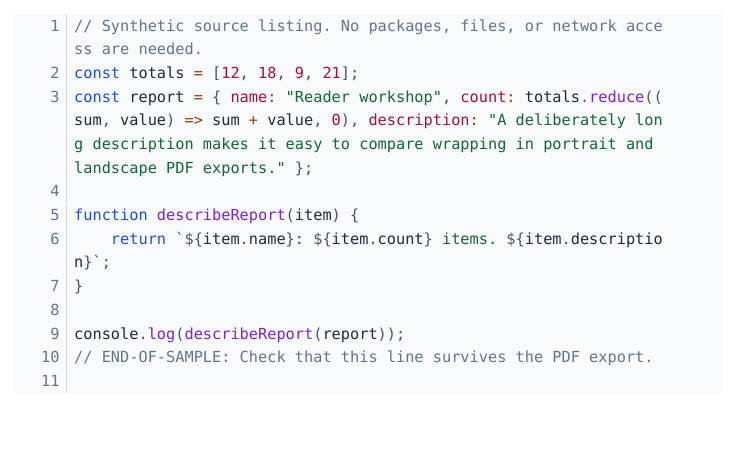
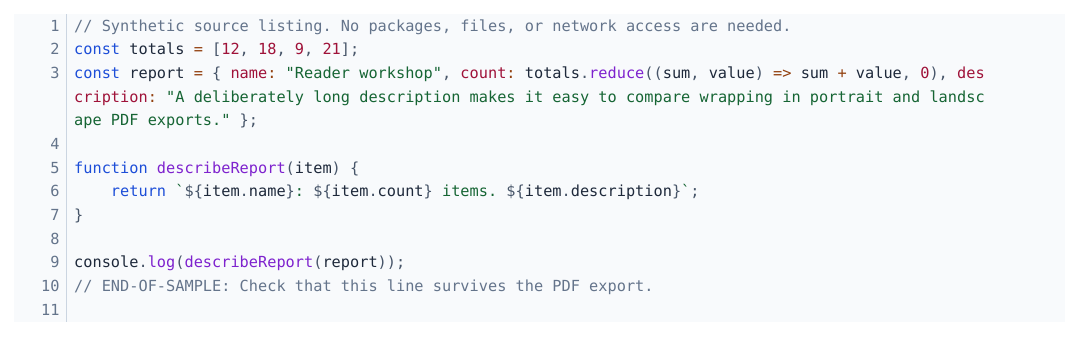
These are cropped views of the generated PDFs. The complete downloads include the full page dimensions.
1. Confirm the input and highlighting language
Drop the file into Code to PDF, then check Language. A file ending in .js.txt may be recognized as plain text; choose JavaScript or remove the final .txt suffix first.
Syntax coloring helps readers distinguish strings, comments, and keywords. It does not check whether a program runs or whether the selected language matches its behavior.
The current input limits are 200,000 bytes and 2,000 lines. Split a large project into relevant files rather than forcing a repository into one document.
When you select Convert to PDF, the formatted listing is sent to RizCraft's server to generate the document. Use a local export method for source that must remain entirely on your device.
2. Change orientation before shrinking the type
For a wide statement, change Orientation to Landscape while keeping the same font and margins. This lets you see what the extra width solves without changing several variables at once.
In the sample, portrait required 16 visual rows and landscape required 13, while both retained 11 numbered source rows, including the final empty line. The source itself did not change.
If the listing is still awkward, try 10 mm margins instead of 15 mm, provided the print layout remains suitable. Reduce font size only after checking the available page width. A file that fits on one page but cannot be read comfortably at normal print size is not an improvement.
The current controls offer A4, Letter, and Legal paper; portrait or landscape; 10–25 mm margins in the available steps; and font sizes from 9 to 14 pt. There is no separate manual wrap-width field.
3. Distinguish a source line from a visual row
When a long line wraps, the converter prints its source number once. The continuation rows underneath do not receive new source numbers. In the example, the long declaration is still source line 3 even when it occupies several rows on the page.
This is useful during review: someone can refer to line 3 without inventing a different line number for each paper width. It also means that the number of visual rows is not the number of source lines.
Keep the source version fixed while collecting comments. If you later reformat the program, line references can change even when its behavior stays the same.
4. Shorten source lines only when the edit is valid code
Page layout cannot make every minified file comfortable to read. Sometimes the better input is a readable source version prepared in your editor.
Download the shorter-line JavaScript sample. Its object is laid out across several source lines, and its description uses two string literals joined with +:
description:
    "A deliberately long description makes it easy to compare " +
    "wrapping in portrait and landscape PDF exports."
The space at the end of the first literal matters. Removing it joins two words in the output. Adding arbitrary line breaks inside a quoted string can change the program or make it invalid.
Both supplied JavaScript versions produce the same console output when run separately. The readable-source portrait PDF shows the second version in the same 11 pt A4 layout.
For Python, expressions inside parentheses, brackets, and braces can span physical lines under its implicit line joining rules. That does not make arbitrary indentation or breaks inside strings safe. The existing Python-to-PDF guide covers a Python-specific example.
Treat source formatting as a code edit. Run the relevant checks in your development environment before exporting the revised file.
5. Choose a style for the final use
Use Colors when syntax coloring helps screen review. Use Mono when the document will be printed in black and white or when color does not add useful information.
Line numbers use some horizontal room, but they are helpful when a reviewer will refer to specific statements. Keep them enabled for a code review; turn them off only when references are unnecessary and the extra space is useful.
For a report that mixes explanations, headings, and a few code blocks, Markdown to PDF may be a better starting point. For a short image to place in a presentation or social post, use Code to Image.
Check the actual download at its intended size
Before sharing or printing, inspect:
- The complete long declaration, including its closing punctuation.
- The line-number gutter and wrapped continuation rows.
- Indentation inside the function.
- The final
END-OF-SAMPLEcomment. - The right edge, page breaks, and final page on a longer listing.
Try selecting and copying a small section. PDF extraction can include line-number text or visual line breaks, so use the original source file when someone needs to run or edit the program.
A title or screenshot of the first page is not proof that the whole listing exported correctly. Open the full PDF and use the same zoom or print size your reader will use.
Export your source code to PDF, compare portrait and landscape, and keep the version that preserves both completeness and comfortable reading.